Output paths and file naming
Go Document Merge saves files into Google Drive. You control the folder structure and file names with a path that can include merge variables.
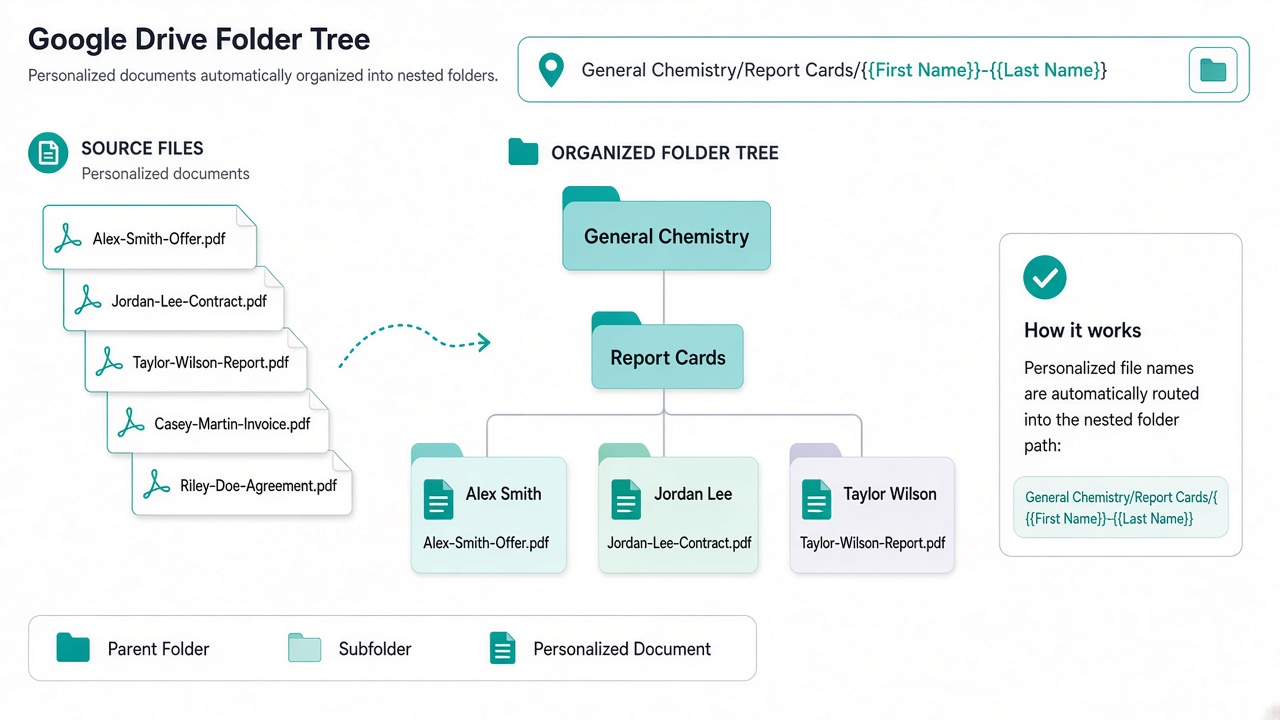
Path format
Use a Drive folder path that matches how you organize files. Add variables from your sheet headers to personalize folders or names:
General Chemistry/Report Cards/{{First Name}}-{{Last Name}}
Another invoice example:
Clients/{{Company Name}}/Invoices/{{Invoice Number}}
What variables do in paths
- Folder segments create nested Drive folders when needed.
- Variables insert the value from the current sheet row.
- Unique paths prevent files for different rows from overwriting each other.
Naming best practices
- Include at least one unique field such as name, ID, or invoice number.
- Keep path segments short and readable.
- Avoid characters that Drive rejects in names.
- Group by project, class, client, or month when you manage large batches.
Example structures
| Use case | Example path |
|---|---|
| Report cards | School/2026/Report Cards/{{Last Name}}-{{First Name}} |
| Invoices | Billing/{{Company Name}}/{{Invoice Number}} |
| Offer letters | HR/Offers/{{Last Name}}-{{First Name}}-Offer |
Next step
Review quotas and limits before you run a very large merge.